Ollama
Overview
Ollama is an open-source platform that simplifies running Large Language Models (LLMs for short) on your local network.
Ollama can serve LLMs to perform various functions through which Bottle Rocket can then integrate - primarily OCR / machine vision models that allow Bottle Rocket captured scans to be interpreted as raw text data for further processing.
Install Ollama
- To install Ollama, follow the download instructions provided on the Ollama website.
- Alternatively, you may wish to utilize Docker to run Ollama alongside the Bottle Rocket platform for convenience.
Pull a model
- Ollama allows you to pull models from the Ollama library to run on your local network. These models are improving and emerging over time; additionally, you can also train and publish your own models on Ollama.
- Bottle Rocket is (currently) focussed on using Ollama models for OCR and text extraction from the captured images,
thus, you will want to pull a model with image analysis capabilities.
- Additionally, you will need to ensure that the model you are using is capable of handwriting recognition, as some OCR models are more suited to structured / printed text and will give limited results with scanned handwriting.
Recommended models (for handwriting OCR)
Run the pull command
- Inside the container or on the host machine with the Ollama installed, run the following command to 'pull' the LLM:
ollama pull <model_name>
tip
If running in a Docker container, ensure you have set up the volume mount correctly, so that the pulled models do not need to be re-downloaded on restart.
Add the Ollama connector to Bottle Rocket
- Login to your Bottle Rocket server.
- On the left-hand sidebar, under My connectors, select Add connector.
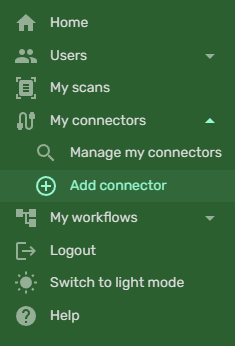
- Select the Ollama App Connector from the list of connectors, and click the Add connector button.
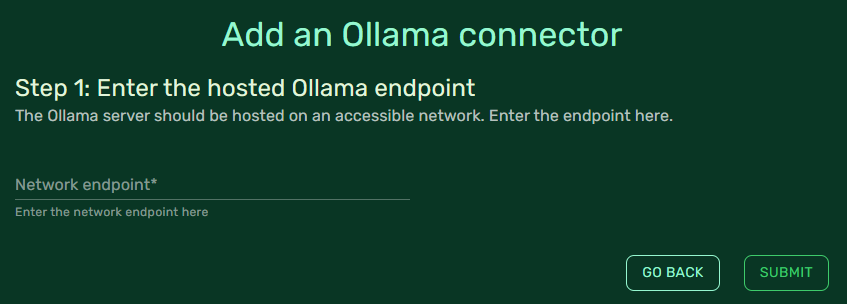
-
For Network endpoint, enter the IP address or local DNS name of the host machine running Ollama.
- If you are running Ollama in a Docker container, you may have to use a container-context URL such as
host.docker.internalor127.0.0.1. - Make sure to include the port number (Ollama defaults to port 11434).
- Ensure that the endpoint value ends with a forward slash (
/).
- If you are running Ollama in a Docker container, you may have to use a container-context URL such as
-
I.e. your endpoint will look something like
http://host.docker.internal:11434/. -
Save the connector by clicking Submit.